


GOWOD – Mobility & Stretching
4.3215.00 Reviews
App Specs
- Version
- 5.11.2
- Updated On
- License
- Free
- Downloads
- 500,000+
- Developer
- GOWOD
- Categories
- Sports
- Platform
- Android, iOS
Screenshots
 Analysis by AppCompare
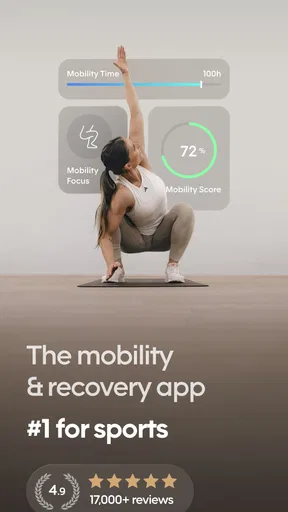
When I want to work on mobility, the hardest part is often deciding what to do and sticking with it long enough to notice a difference. GOWOD – Mobility & Stretching is built around that problem: it gives you a structured way to check how you move and choose stretching work, rather than leaving you to assemble a routine from scattered videos. I find that focused approach most useful when mobility is part of a broader training habit, not a replacement for strength work or medical advice.
Where the app fits in a training week
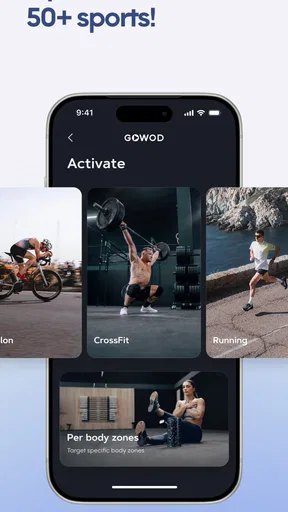
GOWOD is a sports app from developer GOWOD, and its central idea is to make mobility work feel more personal than a generic full-body stretch. That distinction matters in practice. If your ankles feel restricted during squats, for example, a routine aimed at that area is easier to use than replaying a long sequence that spends equal time on every joint. The app’s assessment gives the routine a starting point, while its body-part choices let you make a sensible adjustment when the day’s need is more specific.
I’d think of it as a companion to training rather than a complete fitness plan. It can help you make stretching a deliberate part of a workout, but it does not replace coaching on technique, a balanced exercise program, or a clinician’s guidance for pain or injury. That boundary is important: mobility exercises should feel controlled, and a test result is a prompt for practice, not a diagnosis.
Who is likely to get the most from it?
The clearest fit is someone who already exercises and wants a repeatable way to address stiffness or movement restrictions. CrossFit athletes may recognize the value of working on positions that affect lifts and gymnastics, but the app is not limited to that audience. Anyone who sits for much of the day, returns to training after a break, or struggles to make stretching a consistent habit could find the guided format easier to follow than improvising.
It is less compelling if you only want a single, fixed warm-up that never changes, or if you prefer to choose every movement yourself. People who need rehabilitation should also look to a qualified professional for individual advice instead of treating an app’s personalization as clinical assessment. And if you rarely use guided workouts, the routine structure may feel like more process than you need.
A realistic way to use it
Imagine finishing work with a tight back and hips, then heading to the gym for a session that includes squats. I would use the app before training to select a short routine that addresses the areas I want to prepare, rather than trying to squeeze in a long, general stretch. On a less rushed day, I could do a broader session after training or at home. The practical benefit is not that every session transforms how I move; it is that a clear next step makes it easier to do something instead of putting mobility off again.
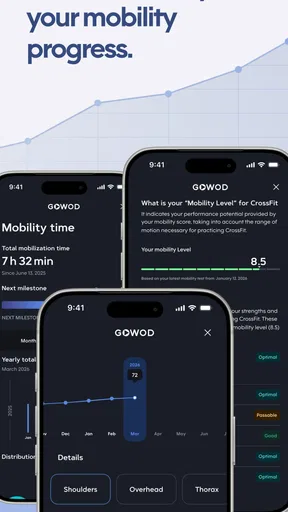
A small habit can also make progress tracking more meaningful. I’d take the assessment under similar conditions each time—when reasonably rested, using the same setup and following the instructions carefully—so changes are easier to interpret. Rechecking after every stretch session would be overkill; periodic checks make more sense because day-to-day stiffness can shift with training, sleep, or how long you have been sitting.
Worth Reading Before You Choose

EA SPORTS FC Mobile 26 Is a Bigger Football Game, but It Takes Time

Flipboard Shows What News Apps Must Do Beyond the Feed

Switching to Android Auto Means Rethinking Your Driving Routine

Google Calendar Makes a Crowded Week Easier to Manage

Ludo King Makes the Most of the Minutes Between Plans

Baby Panda World Brings Quick Play to Modern Phones, but Its Game Library Feels Busy
What it does better than a video search
Free stretching videos are the obvious alternative, and they can be perfectly adequate when you already know what you want to work on. Their weakness is that you have to choose the routine, judge whether it fits your current needs, and remember what you have done. GOWOD’s assessment-led structure reduces some of that decision-making, while demonstrations help you follow movements without guessing from a written name alone. In exchange, you accept a more guided experience and may have less freedom than you would with a playlist or a coach-built plan.
Compared with a general workout tracker, its focus is narrower and more useful if mobility is the gap in your routine. A tracker can record a workout, but it may not help you decide which stretches to do. A human coach can give feedback that a recorded demonstration cannot, especially if you are unsure about form or working around an injury. I see the app as a practical middle ground: more organized than browsing at random, less personal than hands-on coaching.
Small choices that make sessions easier to keep
When time is tight, I’d choose a routine length I can realistically finish rather than repeatedly aiming for an ideal session I skip. The app offers options ranging from 8 to 22 minutes, so that choice can help fit mobility around a workout or a busy evening. I’d also use a body-part selection to focus a short session, then return to broader work when I have more time. The trade-off is that a targeted session can leave other areas untouched, so it should not automatically become the only kind of mobility work you do.
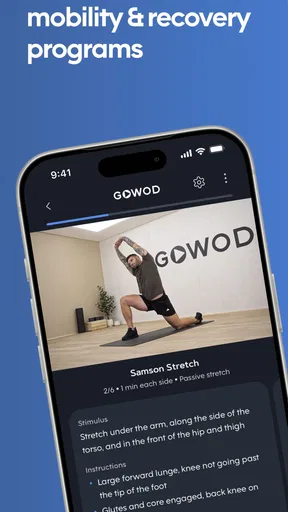
Another useful habit is to treat the videos as movement guides, not a reason to push deeper into a stretch. I would move slowly, stay within a comfortable range, and stop if something feels sharp or unusual. Clear demonstrations lower the learning barrier, but they cannot see or correct your position. That is where a coach or clinician is the better choice if you need individualized form feedback.
Cost, access, and everyday expectations
The app is free to install, with in-app purchases listed from $7.49 to $124.99 per item. That range makes it worth checking the purchase details in the app before building a routine around anything you expect to use regularly. I would not assume that every feature or plan is included at no cost. The app is rated for Everyone, and the available Android version is 5.5.8, with Android 7.0 or later required. It is also available on iOS, so people in a mixed-device household are not automatically excluded.
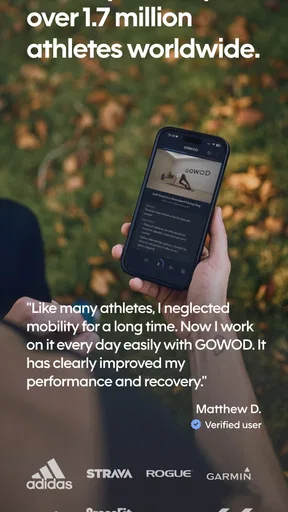
Its audience is substantial: it has more than 500,000 installs and an average rating of 4.5 from around 6,300 ratings, alongside 208 written reviews. Those figures suggest that many people have tried it, but they do not tell me whether a particular routine will suit my body or schedule. I’d use the free entry point to judge whether the guided approach is comfortable and convenient before spending money.
What has changed, and what that means now
The app was released on March 4, 2018, and its current version is 5.5.8. That establishes a product with a long history and an actively numbered version, but it does not by itself show which features changed between releases. I would not treat version numbers as proof that the assessment or routines have recently been redesigned. For someone returning after a break, the practical test is simpler: check the current app experience, see whether the routine choices suit your training, and decide whether it fits your habits today.
For existing users, an updated version can be a reason to check that the app still works smoothly on their device and that their preferred way of finding sessions remains clear. I’d avoid assuming that a version change means scores are directly comparable across every past assessment; the useful comparison is the one you can make consistently using the same setup and instructions. If your routine already works, there is no need to change it just because the version number moved forward.
Limits worth keeping in mind
Personalized routines can make the first step easier, but they cannot know everything that affects how a movement feels on a given day. A test is only as useful as the way you perform it, and a screen cannot assess pain, compensate for a movement restriction, or tell you whether a stretch is appropriate for a particular injury. I would pause rather than force a range that feels wrong, and seek qualified advice when discomfort is persistent or linked to an injury.
There is also a motivation trade-off. Scores and structured sessions can help make an otherwise vague goal concrete, but they can become distracting if you start chasing a number instead of paying attention to comfortable, controlled movement. The app is at its best when it helps you choose and repeat sensible work. It is not a shortcut to flexibility, and a short session should be viewed as a manageable practice, not a guarantee of immediate results.
Who should choose another approach?
If you enjoy building your own mobility routine and already know how to select appropriate movements, a saved playlist or a simple written plan may be quicker. If you want live corrections, a qualified coach is better suited to that job. And if your main goal is general conditioning, strength, or cardio, a dedicated training app will be more relevant; GOWOD concentrates on mobility rather than covering every part of fitness.
I would also be cautious about using any generalized routine as a substitute for professional help when a movement causes pain or when an existing condition changes what is safe. That does not make the app unsuitable for everyone with a limitation; it means the right routine should be guided by someone who understands that limitation. For ordinary stiffness and planned mobility practice, the guided format is much more appropriate than for diagnosis or rehabilitation.
Getting to Know GOWOD
Alright, let’s dive into what GOWOD is all about. This app is designed for people who want to improve their mobility, whether you're a CrossFit enthusiast or just someone looking to move better and feel less stiff. The idea is simple: personalized routines that adapt to your progress and needs.
Set Up and Personalization
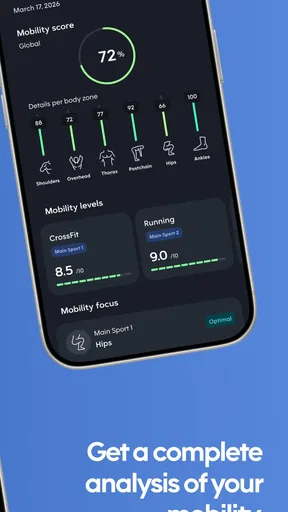
First things first, setting up GOWOD is a breeze. You start with a mobility test that helps the app understand where you’re at in terms of flexibility. It’s pretty straightforward – you just follow the instructions, and the app measures different parts of your body.
Based on your results, GOWOD crafts a personalized plan for you. This is where the magic happens. The app tailors the routines to target your weaker areas and improve them over time. It’s like having a mobility coach in your pocket.
User Interface and Usability
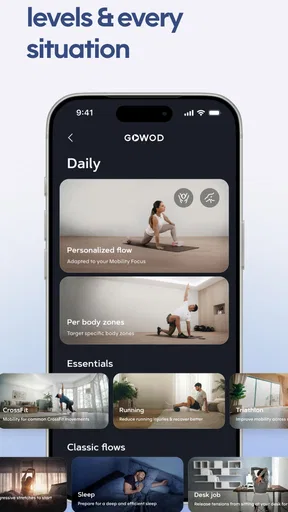
The user interface is clean and intuitive, which is something I appreciate. You don’t have to fumble around trying to find the right routine. Everything is neatly categorized, and the visuals are pleasing to the eye. Plus, the instructions are clear, with video demonstrations to ensure you’re doing each stretch correctly.
Routine Variety
One of the things I love about GOWOD is the variety it offers. Whether you have 8 minutes or 22 minutes, there’s a routine that fits your schedule. The app also allows you to choose routines based on specific body parts or overall mobility improvement. This flexibility is a game-changer, especially on days when you’re short on time.
Progress Tracking
Tracking progress is crucial, and this app does it well. You can re-evaluate your mobility periodically to see how you’ve improved. It’s motivating to see those scores go up, knowing your efforts are paying off.
Integration and Compatibility
If you’re someone who loves tech integrations, you’ll be pleased to know that GOWOD syncs with other fitness apps and devices. It’s compatible with both Android and iOS, so no worries about platform limitations. This makes it easy to incorporate into your existing fitness routine.
Community and Support
There’s a supportive community behind GOWOD. You can connect with others through the app, share your progress, and even participate in challenges. It’s always nice to have that extra push from a community who shares your fitness goals.
My take after weighing the trade-offs
What I like most is the practical bridge between noticing a restriction and actually doing something about it. The test gives the process a starting point, while the short-session option makes it easier to fit mobility into a week that already has training, work, and errands competing for attention. That combination is more useful to me than a huge library of stretches with no guidance on where to begin.
I would still keep expectations grounded. Repeating a routine may help make mobility practice consistent, but the app cannot guarantee that a particular limitation will disappear, and a higher score is not the only sign that movement is improving. Pay attention to how comfortable a position feels during normal activity, and use the app as one tool for practice rather than as a verdict on your body.
Questions I’d settle before committing
Can I try it without paying? The app is free to install, but in-app purchases are available, so I’d review what is included before relying on a paid option. Is it only for serious athletes? No: the intended use can suit someone who simply wants a more guided approach to moving comfortably, though people who want a full workout program should look elsewhere. Does personalization mean a coach is watching my form? No; demonstrations can show a movement, but they cannot provide live correction.
Will it fit a busy schedule? The range of routine lengths makes shorter practice possible, but the best choice is the one you can repeat without rushing. Should I use it for pain? I would not use a mobility app to diagnose or treat pain; persistent symptoms or injury-related questions call for professional advice. Those distinctions help set a fair expectation: it is a tool for structured mobility work, not an all-purpose fitness or health service.
In conclusion, if you’re serious about improving your mobility and stretching, GOWOD – Mobility & Stretching is definitely worth a shot. It’s user-friendly, offers personalized routines, and tracks your improvement effectively. Whether you’re a seasoned athlete or just getting started, this app can help you move better and feel great. So, why not give it a try and see how it can transform your fitness journey?
Pros
- User-friendly interface for easy navigation.
- Customizable routines for personalized sessions.
- Wide range of exercises targeting mobility.
- Progress tracking to monitor improvements.
- Integrates seamlessly with fitness trackers.
Cons
- Requires subscription for full access.
- Limited offline functionality.
- No live support for immediate assistance.
- Some exercises lack detailed explanations.
- May drain battery with prolonged use.
FAQs for GOWOD – Mobility & Stretching
What is GOWOD, and how does it enhance mobility and stretching routines?
GOWOD is a fitness app designed to improve your mobility and flexibility through personalized stretching routines. It assesses your current mobility levels and creates tailored plans to target specific areas that need improvement. With adaptable exercises, it helps users enhance their performance, prevent injuries, and achieve their fitness goals more effectively.
Is GOWOD suitable for beginners, or is it more for advanced users?
GOWOD caters to all fitness levels, from beginners to advanced athletes. The app provides an initial mobility test to determine your current flexibility and suggests workouts based on your results. Beginners can start with basic routines, while advanced users can challenge themselves with more complex stretches, ensuring everyone can benefit from the app.
Can GOWOD be integrated with other fitness apps or devices?
Yes, GOWOD can integrate with other fitness platforms and devices. It syncs well with apps like Apple Health and Google Fit, allowing you to track your progress seamlessly. This integration ensures that you can keep all your fitness data in one place, making it easier to monitor your overall health and performance.
How often should I use GOWOD to see results?
For optimal results, it’s recommended to use GOWOD daily or at least several times a week. Consistent practice is key to improving mobility and flexibility. The app provides flexibility routines that can be easily incorporated into your daily schedule, whether as a warm-up before workouts or a cool-down afterward.
Does GOWOD require a subscription, and what are the pricing options?
GOWOD offers both free and premium subscription options. The free version provides basic features, while the premium subscription unlocks personalized plans and advanced features. Pricing for the premium version varies, often including monthly or annual plans. Check the app store for the latest subscription details and promotions.


